












How to Play Muffet Fight Simulator
Muffet Fight Simulator lets you replay a fan recreation of the Muffet fight from Undertale directly in your browser. Click Play, then click inside the game window so it receives your keyboard input. Use the Arrow Keys to navigate the battle menu, Z to confirm your choice, and X to cancel or return where supported.
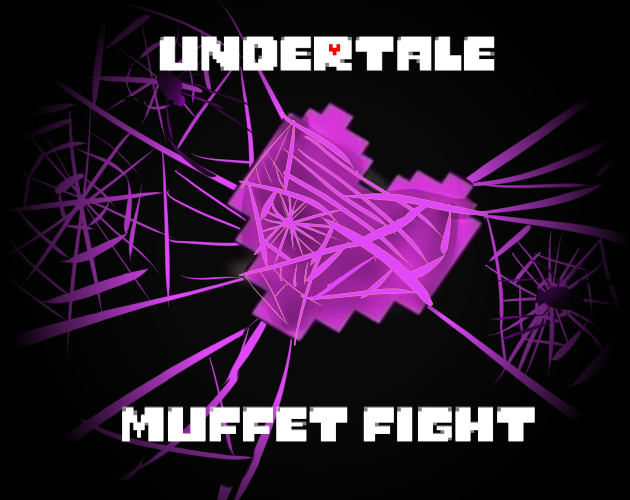
The key mechanic of this Undertale Muffet fight is the purple SOUL. Once Muffet traps your SOUL in her web, movement becomes lane-based. Move left and right along the current web line, then use Up or Down to switch between the available lanes as spiders and other attacks approach. Instead of trying to move freely around the entire battle box, watch which lane is about to become dangerous and change position before the attack reaches you.
Between attacks, use the familiar FIGHT, ACT, ITEM, and MERCY choices to continue the Muffet boss fight. If the keyboard stops responding after Search, Restart, Fullscreen, or another website control, click inside the game window once to restore focus.
Muffet Fight Controls
| Key | Action |
|---|---|
| Arrow Keys | Navigate menus and control your SOUL during attacks |
| Left / Right | Move along the current spider-web lane |
| Up / Down | Switch between web lanes while the SOUL is purple |
| Z | Select or confirm an action |
| X | Cancel or go back where supported |
Click inside the game window first if the controls do not respond.
About the Undertale Muffet Fight
This Muffet boss fight is a fan-made recreation by BoredPancake based on Muffet's encounter in Undertale. The battle recreates her distinctive purple-SOUL mechanic, where the player is trapped on spider-web lanes instead of moving freely throughout the entire battle box.
The fight also brings back Muffet's spider-themed attack sequence, including enemies and food-shaped hazards that move across the web. This is a standalone fan recreation rather than the official Undertale release, so exact timing, hitboxes, dialogue, damage, and individual attack behavior may differ from the original game.
Tips for the Muffet Boss Fight
- Think in lanes once your SOUL turns purple. Up and Down change web lines instead of giving you normal free movement. Check which lane the next attack occupies before changing levels.
- Use horizontal movement before making unnecessary lane changes. If an opening is available on your current web line, moving left or right is often safer than crossing into another lane and meeting a second attack.
- Change lanes before an incoming spider reaches your position. Waiting until the projectile is already beside your SOUL gives you less time to settle onto the next web line.
- Watch for different attack shapes. Spiders, donuts, croissants, and other hazards do not all occupy the web in the same way. Read the next opening rather than repeating the exact same movement for every pattern.
- Give yourself extra room during Muffet's pet sequence. The pet section introduces a denser web layout, so avoid making unnecessary horizontal movements while you are also changing vertical position.
- Use ITEM before your remaining HP becomes critical. Healing costs a player turn, so make the decision while you still have enough health to survive the next Muffet attack.
- Do not spam Z when the battle becomes spareable. Use deliberate inputs while advancing the final dialogue. The original project notes that repeated Z inputs can cause a display issue around this part of the fight.
Frequently Asked Questions
What is Muffet Fight Simulator?
Muffet Fight Simulator is a standalone fan recreation of the Muffet boss fight from Undertale. It lets you replay the encounter directly in your browser without going through the full game first.
What are the Muffet Fight controls?
Use the Arrow Keys to control the menus and your SOUL, Z to select or confirm, and X to cancel or return where supported. When your SOUL is purple, Left and Right move along a web lane while Up and Down switch between lanes.
Why can my purple SOUL only move on the web?
That is the main mechanic of the Undertale Muffet fight. The purple SOUL is restricted to spider-web lanes, so you dodge by moving horizontally and changing to another lane when an incoming attack blocks your current path.
How do you spare Muffet in this fight?
Survive the battle until Muffet becomes spareable, then open MERCY and choose SPARE. SPARE is not available as an immediate way to end the fight at the beginning.
What attacks are in the Muffet boss fight?
This recreation uses Muffet's web-based battle mechanic together with spider-themed and food-shaped hazards. The current version includes attacks involving spiders and other objects that cross the different web lanes.
Can I fight Muffet instead of sparing her?
The battle includes the standard FIGHT and MERCY choices. Choose how you want to approach the encounter, but the exact outcome follows the rules implemented in this fan recreation.
Is this the official Undertale Muffet fight?
No. It is a fan-made recreation by BoredPancake based on Muffet's battle in Undertale. Timing, damage, hitboxes, dialogue, and some attack behavior may differ from the official game.
Why are the controls not working?
Click once inside the game window to restore keyboard focus. Search, Restart, Fullscreen, or other website controls can temporarily move focus away from the game.