












How to Play Omega Flowey Fight Simulator
Before the actual boss fight starts, you must navigate a very specific, intentionally confusing startup sequence designed to mimic the original Undertale narrative. When the application loads, you will be presented with a corrupted save screen displaying a file named "My World". On this screen, the "Restart" option is intentionally unavailable. You must select the "Continue" option to proceed. After confirming your choice, your character, Frisk, will appear alone in a completely black area.
At this moment, it is crucial that you click directly inside the game window to guarantee your browser has granted keyboard focus to the application. Once focused, hold the Up Arrow key to continuously walk north. Because the camera is locked onto Frisk and the background is entirely black, it will initially look like your character is just walking in place. Do not stop. Keep holding the Up Arrow key until a glowing SAVE Point eventually appears on the screen. Walk up to it and press the Z key to interact. This action will trigger Flowey's dialogue sequence, which eventually transitions into the actual Omega Flowey battle.
Once the battle begins, you take control of the red human SOUL. Unlike standard turn-based RPG encounters, your primary objective here is pure survival against an overwhelming, real-time bullet hell. You must dodge massive, chaotic attacks during Flowey's main offensive phases. Periodically, the fight will be interrupted by the six human SOUL phases, where you must survive a specific minigame until an ACT button appears. Calling for help during these phases provides healing. You must endure this cycle until the final battle progression allows the FIGHT button to appear, giving you the chance to finally strike back and defeat the boss.
Controls
| Key | Action |
|---|---|
| Arrow Keys (Up, Down, Left, Right) | Move your red SOUL during combat and navigate the opening menu selection |
| Z | Select menu options, advance dialogue text, and interact with the SAVE Point in the black room |
| X | Cancel selections and speed up dialogue text during the narrative sequences |
| P | Toggle the screen shake effect on or off (useful if the intense visual shaking causes discomfort) |
About Omega Flowey
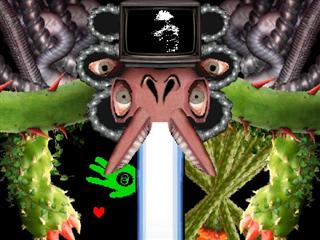
In the official Undertale storyline, Omega Flowey (also widely known by the community as Photoshop Flowey) is the terrifying, reality-warping final boss of the Neutral Route. After absorbing the six human souls, Flowey transforms from a simple, pixelated flower into a massive, grotesque amalgamation of photorealistic imagery, pipes, and television screens. The encounter is famous for intentionally breaking the fourth wall, crashing the player's game, manipulating save files, and completely abandoning the traditional turn-based combat system established earlier in the game.
The version hosted on this page is an incredibly detailed fan recreation of that iconic boss battle. The Undertale fan community commonly refers to this entity as both Omega Flowey and Photoshop Flowey, and this simulator aims to capture the overwhelming difficulty and chaotic visual aesthetic of the original encounter. It is important to note that while this simulator is highly accurate to the source material, it is an independent recreation built to allow players to practice the boss fight directly in their web browsers.
By offering this battle as a standalone experience, players do not need to replay the entirety of a Neutral Route just to face Flowey again. You can use this simulator to study the complex hazard patterns, practice your dodging skills during the dense bullet-hell segments, and experience the thrilling progression of the human SOUL phases without any prior save file requirements or software downloads.
Omega Flowey Battle Mechanics & Human SOUL Phases
The battle mechanics in the Omega Flowey Fight Simulator alternate between two distinct states: Flowey's main attack phases and the six human SOUL interruptions. During the main phases, you must dodge a variety of devastating, screen-filling attacks. You will see warning markers indicating where damage is about to occur. For example, red targeting circles indicate where massive bombs will drop and explode, while exclamation marks on the sides of the screen warn of incoming thorny vines that sweep horizontally. Flowey will also utilize dual flamethrowers, finger guns that fire expanding bullet rings, and eye-shaped projectiles that bounce across the arena.
Because you cannot attack Flowey during these main phases, your only goal is survival. Eventually, the screen will distort, and you will be pulled into a human SOUL phase. There are six of these phases, corresponding to the traits of Light Blue (Knives), Orange (Gloves), Blue (Ballet Shoes), Purple (Notebook), Green (Frying Pan), and Yellow (Gun). During a SOUL phase, you must dodge a themed attack pattern for a set duration. Once you survive long enough, an ACT button will appear on the screen. You must maneuver your SOUL to press this ACT button, which "calls for help."
Calling for help is the most critical mechanic in the fight. Once activated, the harmful projectiles in the SOUL phase will instantly transform into green healing items. Collecting these green items is your primary method of recovering HP. After the healing sequence concludes, you are thrown back into Flowey's main attack phase, but his defense drops slightly. The battle also utilizes fake SAVE and LOAD visual tricks to disorient you. Flowey will appear to save the game and then reload a previous state to hit you with an unavoidable attack. These are scripted visual glitches intended to induce panic; they do not mean the simulator has actually crashed or broken. This grueling cycle repeats until all six souls have rebelled, leading to the finale where your FIGHT button finally becomes active.
Tips for Surviving the Simulator
- Navigate the Black Room Properly: Many players get confused at the start. When Frisk appears in the black area, just hold the Up Arrow key. The camera moves with you against a black void, creating the illusion of walking in place. Keep holding Up until the SAVE Point appears.
- Secure Keyboard Focus: If your arrow keys are scrolling the webpage instead of moving your character, click directly inside the game window to ensure the browser registers your inputs.
- Read the Warning Markers: Pay close attention to the visual telegraphs. Red circles mean bombs are dropping, and exclamation marks mean vines are extending. Move out of these marked zones immediately before the attack actually renders.
- Prioritize Healing During SOUL Phases: When you successfully press the ACT button during a human SOUL phase, drop everything and collect as many green healing items as possible. This is your main source of recovery to survive the next main phase.
- Ignore the Fake Glitches: When the game appears to freeze, display visual static, or show a fake "File Loaded" screen, do not refresh your browser. These are intentional narrative mechanics designed to scare you. Keep your hands on the controls and be ready to dodge.
- Use Micro-Movements for Projectiles: When Flowey fires the bouncing eye projectiles or finger guns, avoid making massive movements across the screen. Use small, precise taps of the arrow keys to weave between the gaps in the bullet rings.
Frequently Asked Questions
Is this Photoshop Flowey or Omega Flowey?
Both names refer to the exact same entity. 'Photoshop Flowey' references his bizarre, photorealistic visual style, while 'Omega Flowey' is a popular fan-given name describing his ultimate power level. The Undertale community uses them interchangeably.
Can I play Omega Flowey online?
Yes. This page hosts a highly accurate, fan-made Omega Flowey Fight Simulator that runs directly in your web browser, allowing you to practice the boss battle instantly.
Why does Restart not work on the 'My World' screen?
This is an intentional feature mimicking the original game's narrative. Flowey has seized control of the save file, so the Restart button is disabled. You must select 'Continue' to proceed into the black room.
Why does Frisk look stuck in the black room?
Frisk is not actually stuck. Because the camera follows the character against a completely featureless black background, it creates an optical illusion of walking in place. Just hold the Up Arrow key continuously until the glowing SAVE Point appears, then press Z.
What are the Omega Flowey controls?
Use the Arrow Keys to move your SOUL and navigate menus, press Z to interact and advance text, press X to cancel or speed up dialogue, and press P to toggle the screen shake effect.
How do the six human SOUL phases work?
The battle is periodically interrupted by six distinct minigames (representing the six absorbed souls). You must survive themed attacks until an ACT button appears. Pressing it calls for help, turning the attacks into healing items and weakening Flowey.
How do I heal during the Omega Flowey fight?
You cannot heal using a traditional ITEM menu. Your only way to recover HP is to successfully reach the ACT button during the human SOUL phases and collect the green projectiles that spawn afterward.
Why does the game use fake SAVE / LOAD screens and glitches?
These are scripted visual events designed to break the fourth wall and make the player feel helpless. Flowey uses his powers to 'save' before an attack and 'reload' to hit you repeatedly. Do not refresh your page; the simulator is working exactly as intended.
Is Omega Flowey the same as Meta Flowey?
No. Omega / Photoshop Flowey is the official final boss of the Undertale Neutral Route. Meta Flowey is an entirely different fan-created boss specific to the Undertale Yellow fan game.
Is Omega Flowey the same as Flowery?
No. Flowery is a completely distinct, fan-made battle simulator that features an intense, custom bullet-hell encounter against a standard-looking flower, rather than the photorealistic amalgamation of Omega Flowey.


