


























How to Play Bonetale (Sans vs. Frisk)
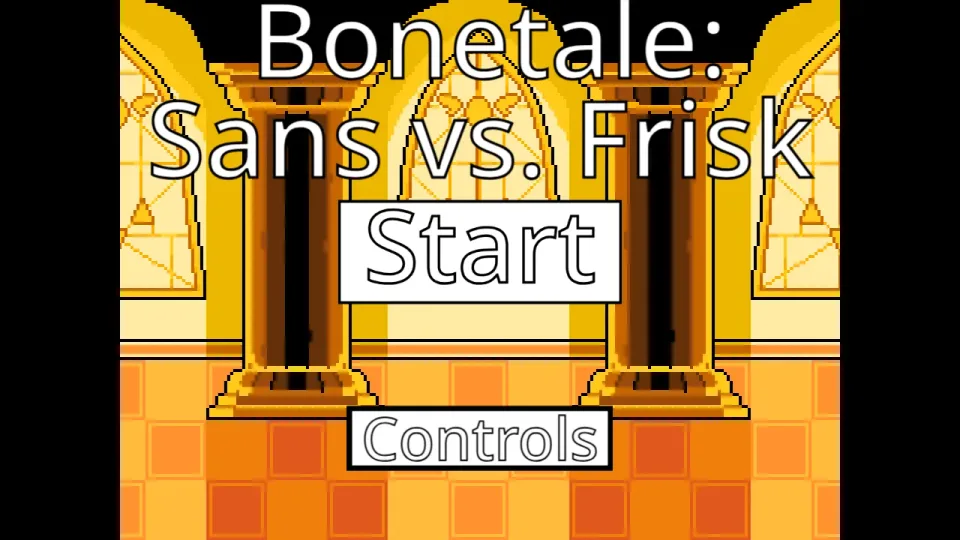
After clicking the Play button and allowing the game engine to load, click directly inside the game window to ensure the application captures your keyboard inputs. This version of Bonetale completely flips the traditional Undertale dynamic: instead of playing as a human dodging attacks, you take full control of Sans in a direct confrontation against Frisk. This is a dedicated, single-player battle simulator focused entirely on mastering Sans's offensive capabilities.
Because you are controlling the boss character, your primary objective is to defeat Frisk by strategically deploying a variety of attacks while managing your resources. When the battle begins, it is highly recommended to spend your first attempt safely testing your control layout. Press each attack key individually to observe its trajectory, energy cost, and execution delay. Different attacks behave differently, and pressing every key simultaneously will quickly drain your energy and leave you vulnerable.
Frisk is not a static target; the opponent will actively move around the battlefield to evade your projectiles. Therefore, winning requires more than just spamming attacks. You must anticipate Frisk's movements, restrict their escape routes, and time your heaviest strikes carefully. Simultaneously, you must use your movement keys to control Sans's positioning, ensuring you maintain a tactical advantage throughout the encounter while keeping an eye on your crucial energy and health indicators.
Controls
| Key | Action |
|---|---|
| Arrow Keys (Up, Down, Left, Right) | Move Sans freely around the designated battlefield area to maintain tactical positioning |
| Z, X, C Keys | Trigger your primary offensive abilities, including standard bone projectiles and heavy-hitting Gaster Blasters |
| Number Keys (1, 2, 3...) | Activate special attacks, gravity manipulation, or switch between different combat modes depending on the current phase |
| Mouse | Navigate certain menus or select specific interface options on the title screen |
About Bonetale (Sans vs. Frisk)
Bonetale (Sans vs. Frisk) is a fan-made battle project that allows players to experience an Undertale encounter from the perspective of the judge. The specific browser version featured on this page stems from the Bonetale project originally created by Revilollibark. It was designed as an accessible, focused battle engine where players could test combat mechanics, experiment with Sans's signature attacks, and see what it feels like to be on the offensive side of the iconic final corridor encounter.
It is incredibly important to clarify that this browser game is not the same as Woloned's massive Bonetale release for Android and Windows devices. Woloned's game is a much larger application that features multiple unlockable playable characters (including Papyrus, Undyne, and others), an expansive Adventure Mode, a detailed Character Creator, multiplayer functionalities, and complex difficulty scaling systems. Those extensive features are entirely absent from this specific webpage.
The game hosted on this page is strictly a compact, browser-compatible fan battle centered exclusively on the Sans versus Frisk dynamic. It is presented here for players who want a quick, seamless way to experience controlling Sans's magic without having to download, install, or configure a heavy external application. It stands on its own as a unique, playable combat project.
Sans's Attacks & Combat System
Taking control of Sans completely changes how you must approach combat. Instead of relying on passive dodging, you must master an active, resource-driven offensive system. The most critical mechanic in this simulator is Energy Management. Every powerful attack you unleash, from summoning bones to firing laser beams, consumes a portion of your energy gauge. If you fire blindly and exhaust your stamina, you will be unable to attack, leaving Frisk free to maneuver and retaliate. Learning the energy cost of each move is essential for maintaining sustained pressure.
Your primary tools for restricting movement are Bone Attacks. These projectiles can be summoned to travel horizontally or vertically across the screen. While individual bones might not deal massive damage, they are excellent for forcing Frisk into corners or blocking off safe zones. Advanced players use bone attacks to build a cage around the opponent, limiting their options for evasion.
Once Frisk is trapped or moving predictably, you can utilize your Gaster Blasters. These massive skull cannons deal significant damage but come with a noticeable firing delay and a high energy cost. Because the beam does not fire instantly, you must anticipate where Frisk will be, not where they currently are. Firing a Gaster Blaster into an empty space wastes critical energy and gives the opponent a chance to strike.
Finally, you must never forget your own positioning. While you are launching your offensive, Frisk remains a highly dangerous adversary who will attempt to reach you. You must actively use your movement controls to reposition Sans across the designated battlefield area, keeping yourself out of immediate danger while you wait for your energy reserves to recharge for the next attack sequence. The dynamic interplay between managing your own safety, predicting the enemy's escape routes, and executing complex attack combos is what makes playing as the boss so engaging.
Tips for Mastering Sans
- Restore Keyboard Focus: The game cannot read your inputs if it is not selected. Always click directly on the game window after it finishes loading to ensure your attacks and movements register immediately.
- Test Attacks Safely: Do not try to win on your very first attempt. Use your first run purely as a practice session to press every attack key (Z, X, C, and Numbers) and memorize what each one does and how much energy it consumes.
- Do Not Spam Blasters: Gaster Blasters look impressive, but spamming them will instantly drain your energy. Save them for moments when you are certain they will hit, rather than firing them randomly across the screen.
- Trap, Then Strike: A moving target is hard to hit with heavy attacks. Use your lighter, faster bone projectiles to corral Frisk into a specific section of the screen, and then punish them with a well-aimed Gaster Blaster.
- Monitor Your Stamina: Always keep one eye on your energy gauge. Never let it hit absolute zero, as you need to retain enough stamina to react defensively or counter unexpected movements from the opponent.
Frequently Asked Questions
What is Bonetale (Sans vs. Frisk)?
This page features a fan-made browser battle where you take control of Sans and use his signature magical attacks to fight against Frisk.
Is this Woloned's Bonetale game?
No. Woloned's Bonetale is a separate, extensive Android and Windows game with additional characters, adventure modes, and unlockables. The game on this page is a focused, browser-based fan battle.
Can I play as other characters like Papyrus or Undyne in this version?
No. This specific browser version focuses exclusively on the confrontation between Sans and Frisk. You can only control Sans.
Can I play Bonetale online without downloading it?
Yes. This Sans vs. Frisk browser version runs completely within your web browser, allowing you to play instantly without installing any external files.
What are the controls for playing as Sans?
You use the Arrow Keys to move Sans around the screen, and keys like Z, X, C, and the Number keys to trigger different bone projectiles and Gaster Blaster attacks.
Why am I suddenly unable to use my attacks?
You have likely depleted your energy. Most of Sans's attacks consume stamina, and if you use too many high-cost abilities quickly, you must wait for your energy to recharge before attacking again.
Why are my keyboard commands not registering?
Click inside the actual game window once to restore keyboard focus. This is especially necessary after using the search bar, restarting, or entering fullscreen mode.