What Is DELTARUNE Fight?
DELTARUNE Fight [UPDATE] is a fan-made Roblox experience created by ItsIsaacIO that focuses entirely on combat. It's less about exploring a full RPG world and more about getting straight into the action. The game borrows the visual language you probably already know from Deltarune—party status, TP, a red SOUL dodging inside attack boxes—but packages those ideas into a fast-paced Roblox fight simulator.
Because it's a Roblox game, you can't play it directly on a website. You'll need the Roblox client. To make sure you're playing the right game (and not one of the many other simulators with similar names), check that the creator is @ItsIsaacIO and the Place ID is 102053304052438. (We keep the IDs handy just to be sure!)
Many players first discover this game through a viral YouTube video or a Reddit clip showing off a crazy attack pattern or a recognizable boss, often without the game's actual name attached. If you've been wondering 'what game is this?' after seeing a Roblox Deltarune battle, there's a very high chance this is exactly what you're looking for.
How to Play DELTARUNE Fight
Ready to jump in? Before you do, make sure you're heading to the correct official Roblox page. Avoid any shady third-party sites offering standalone downloads—Roblox handles everything you need to play safely.
Once you're in, take a second before mashing buttons. DELTARUNE Fight changes context often, and the same button can mean different things depending on whether you're in a menu, a battle box, or a special sequence.
- Find the right game
Search for 'DELTARUNE Fight' on Roblox and look for the one created by ItsIsaacIO. There are a lot of fan games with similar names, so double-checking the creator is the best way to ensure you're in the right place.
- Launch through Roblox
Hit the big green Play button on the Roblox page. If you're on a PC, your browser will ask to open the Roblox Player. On mobile or console, just use the official Roblox app.
- Learn the basics: Z, X, and C
The developer officially lists Z for Confirm, X for Go Back, and C as a context-dependent action. Don't assume C does the same thing everywhere—pay attention to the on-screen prompts!
- Scan the interface
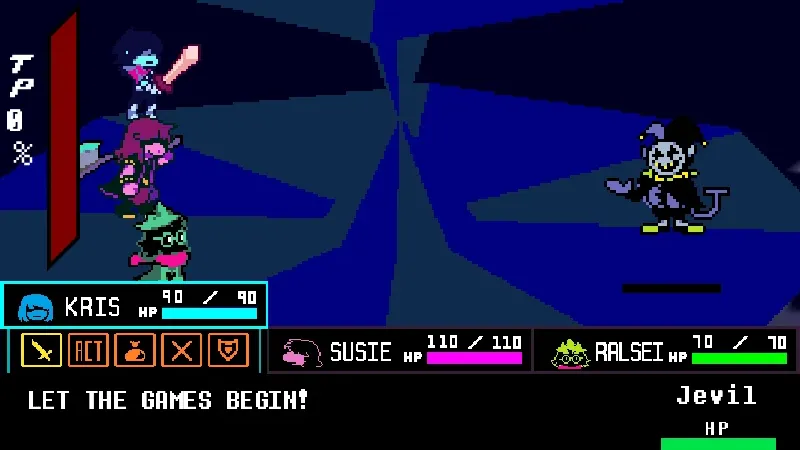
When a battle starts, you'll see party HP, a TP gauge, and the main battle area. Don't get tunnel vision on just one part of the screen. Look around to understand what's active before making a move.
- Expect the unexpected
While it looks like Deltarune, this is a fan simulator with its own twists. Fights can introduce new mechanics, so keep an open mind and don't expect it to play exactly like the original game 100% of the time.
- Keep an eye out for updates
The [UPDATE] in the title isn't just for show. The game gets updated with new content and tweaks, meaning older YouTube videos might not reflect the current version. Always trust what the game is telling you right now over an old guide.
DELTARUNE Fight Controls
The developer officially publishes a very simple control scheme: Z to confirm, X to go back, and C for context-sensitive actions. For movement or platform-specific buttons, you'll need to follow the prompts shown in the game itself.
Because the game is constantly evolving, Z and X are best thought of as menu navigation, while C handles special actions that change depending on what's happening. If you're playing on a mobile device or a console, the game fully supports them, but the exact button layout will adapt to your screen or controller. Always look for on-screen tooltips if you're unsure what to press.
| Device | Input | What is verified |
|---|---|---|
| PC keyboard | Z | Confirm the current selection. |
| PC keyboard | X | Go back or cancel. |
| PC keyboard | C | Context-sensitive. Read the on-screen prompt. |
| Mobile | Touch Controls | Use the on-screen buttons provided by the Roblox app. |
| Console | Controller | Follow the button prompts shown on your screen. |
DELTARUNE Fight Launch & Control Helper
Having trouble getting the game to work or figuring out the controls? Select your device below for quick troubleshooting tips.
Make sure you're opening the game through the official Roblox website or app. If the client won't launch, check if your browser is blocking pop-ups, or try reinstalling the Roblox Player.
Combat & Gameplay Mechanics
Combat in DELTARUNE Fight is fast, chaotic, and heavily inspired by the source material. Whether you're dodging projectiles in a tiny box or managing your party's health, here is a breakdown of the core mechanics you'll need to master.
Reading the Battle Screen
When a fight starts, there's a lot going on. You've got your party's HP at the bottom, a TP (Tension Point) gauge, and the main battle arena where the dodging happens. It's easy to get overwhelmed, so the best advice is to learn where everything is before the real chaos starts.
Take a deep breath and scan the interface. Knowing exactly where to glance to check your health or see if you have enough TP for a special move can save your run.
SOUL Dodging
The bread and butter of the game. Your red SOUL will be dropped into a battle box, and your job is simple: don't get hit. Projectiles will fly at you in all sorts of crazy patterns.
Don't just stare directly at your SOUL. Try to look at the edges of the box to see where attacks are coming from before they reach you. Make small, controlled movements instead of panicking and sweeping across the entire box.
TP and Party Status
Just like in Deltarune, you'll be managing a party. Keep an eye on Kris, Susie, and Ralsei's HP. If someone goes down, the fight gets much harder.
You also have a TP gauge that fills up as you graze bullets (getting close without taking damage) or defend. Use TP wisely for healing or powerful attacks. It's an essential resource, so don't ignore it!
Changing Attack Boxes
The battle arena isn't static. It can change shape depending on the attack. A wide arena gives you plenty of room to maneuver, while a narrow, cramped box means positioning is absolutely critical.
Expect the unexpected. The box might shift abruptly, forcing you to change your dodging strategy on the fly.
Timing and Special Sequences
Sometimes, the normal dodging stops and the game throws a special timing sequence at you. You might need to hit a button exactly as a marker passes a certain point, almost like a rhythm game.
When these pop up, shift gears immediately. Stop trying to dodge and focus entirely on the new prompts. The game loves to keep you on your toes by switching interaction styles.
Why Every Encounter Feels Different
Because this is a fan simulator, the creator has the freedom to experiment. One boss might test your memory, another might test your raw reaction speed, and another might completely flip the UI upside down.
Don't expect the same strategies to work on every enemy. Adaptability is your best weapon.
What Isn't Confirmed
Public sources do not reliably document a complete boss roster, exact HP/damage values, the specific TP formula, unlock requirements, or complete controller layouts.
Because the game updates frequently, old information gets outdated fast. If the live game shows something different from what you read online, always trust the current build.
What Players Talk About
DELTARUNE Fight has a highly active community, though a lot of the discussion happens in the comment sections of viral clips rather than on official forums. Here's a look at what players are actually talking about.
Why people keep asking “What game is this?”
If you found this game through a random video online, you're not alone. Countless players see a clip of an insane boss attack or a funny custom animation on Reddit or TikTok and immediately dive into the comments trying to figure out what game it is.
Because the footage often lacks a title, the community has gotten very good at identifying DELTARUNE Fight and pointing newcomers in the right direction.
The fights are what get people talking
Players love to talk about the visual spectacle. Whether it's a wildly difficult bullet pattern, a surprise appearance from a recognizable character, or just a really smooth animation, the presentation is what keeps the community buzzing.
You'll often see players swapping tips on how to beat the hardest encounters or debating which boss has the best attack phases.
Updates make old advice unreliable
The game gets updated pretty regularly. A strategy video from six months ago might be totally useless today because a boss's attack pattern changed or a new mechanic was introduced.
The community knows this, which is why players are always asking if a certain fight was part of a recent patch. Always take older videos with a grain of salt.
Similar names cause a lot of confusion
There are a ton of Deltarune fan games out there. DELTARUNE Fight, DELTARUNE Battles, and browser-based simulators often get mixed up in discussions.
It's incredibly common for someone to ask for help with a boss, only to realize they are playing a completely different Roblox game. That's why verifying the Place ID (102053304052438) is actually pretty important!
Beginner Tips: Things to Know Before Playing
Learn Z and X first
Get comfortable with Z for Confirm and X for Go Back. It makes navigating menus much faster.
Watch the prompt before pressing C
C does different things depending on the situation. Read the screen before you press it so you don't waste an action.
Keep an eye on party HP and TP
Don't let your teammates drop to zero.
Don't hug the corners
Hiding in the corner of the battle box might seem safe, but it limits your escape routes when a wide attack comes.
Read the first wave
When a new attack starts, spend the first second observing the pattern rather than moving frantically.
Expect the arena to change
The battle box will stretch and shrink. Be ready to adjust your movement speed based on how much space you have.
Recheck old advice
If a YouTube video tells you to do something and it isn't working, the game might have updated. Trust the live game.
Check the game name
If community information seems totally wrong, make sure it's actually for DELTARUNE Fight and not a different Roblox simulator!
Updates & Why Information Can Change
DELTARUNE Fight is an actively updated game—hence the [UPDATE] tag in the title.
Because of this, you should always expect the game to change. Older YouTube videos and community guides may not always match the current version, so follow the live game's prompts when something differs.
If you load up the game and find that the controls have shifted or a menu looks entirely different, always trust the live client in front of you. The current game is the final authority!
Playable Deltarune Games
These are separate browser-based Deltarune fan projects available on this site (such as Deltarune Battle Simulator V4 and Jevil Fight Simulator). They are not alternate builds, ports, or downloadable versions of ItsIsaacIO's Roblox experience, and their controls and mechanics should not be applied to DELTARUNE Fight.

DELTARUNE Fight FAQ
What is DELTARUNE Fight?
It's a fast-paced Roblox fan game by ItsIsaacIO that recreates and expands upon the battle mechanics of Deltarune.
Is DELTARUNE Fight an official game?
No. It's a fan-made project on Roblox. It credits Toby Fox and the official team, but it is entirely independent.
Where can I play it?
You can play it directly on Roblox by searching for DELTARUNE Fight by ItsIsaacIO (Place ID 102053304052438).
What are the basic controls?
The official controls are Z to Confirm, X to Go Back, and C for context-sensitive actions. For movement, just follow the standard Roblox controls or on-screen prompts.
Can I play on mobile?
Yes! The game officially supports mobile devices. Just use the touch controls that appear on your screen.
Is console supported?
Yes. You can play on console. Follow the controller button prompts shown in the game.
Is the game free to play?
Yes, it is free to launch on Roblox, though Roblox itself may have optional platform-wide purchases.
Who made this game?
The game was created by the Roblox user ItsIsaacIO.
What bosses are in the game?
The game is frequently updated with new encounters. It's best to jump in and check the live game to see the current roster!
Is this the same as Deltarune Battle Simulator?
No. DELTARUNE Fight is a Roblox experience, while Deltarune Battle Simulator is a separate browser game.
Why did the controls change?
The developer regularly updates the game. If a button stops doing what it used to, check the on-screen prompts for the updated layout.
Related Games
More Undertale and Deltarune-inspired browser battles on this site.